
A free community server where cheat menus can't see who the impostor is, can't zoom out or see through walls, and cheaters get kicked and called out in chat.
No mods. You play the normal game on the AmongShield region.
Works on PC, Mac, Android and iPhone. PlayStation, Xbox and Switch can't use custom servers.
🌫️ Anti-zoom fog NEW
Zoom hacks and wallhacks see an empty map.
Most anti-cheats try to catch a cheater after the damage is done. AmongShield makes sure the information never reaches the cheater in the first place: the server only sends your game the positions of players you could actually see, inside your vision and not hidden behind a wall.
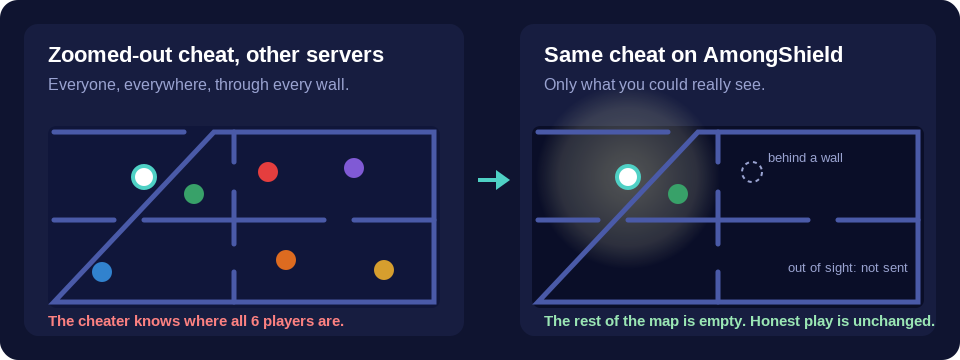
- Stops zoom-out, see-through-walls and player radar from cheat menus like MalumMenu. There's nothing to show them.
- Honest players see nothing different. People step out of the shadows exactly like they always do.
- Admin, cameras, binoculars, Tracker and Detective still work: whoever is using them gets everyone's real position.
- On in every lobby. The host can type
/fog offin the lobby to turn it off, and/fog onto bring it back.
AmongShield is the only Among Us anti-cheat that can do this right now.
📱 Phone (Android, iPhone)
- Open Among Us and wait for the main menu. Leave it running.
- Switch to this page on your phone (don't close the game) and tap the button.
- Back in Among Us, tap the region button (globe, bottom right) and pick AmongShield.
AmongShield not in the list? Tap the button again while the game is running. If the Play Store opens, install Among Us first.
Still not working? Try the official Impostor setup page (already filled in for AmongShield, just tap its Android or iPhone button). Still stuck? Tell us your phone model.
💻 PC (Steam, Epic, Microsoft Store)
- Close Among Us.
- Open PowerShell: press the Start key, type PowerShell, press Enter.
- Paste this line and press Enter:
irm https://amongshieldserver.github.io/AmongShield/Add-AmongShield.ps1 | iex - When it says Server successfully added!, start Among Us. AmongShield is already selected. If something goes wrong, the message says what to do.
Works with every PC version: Steam, Epic Games, itch.io and the Microsoft Store / Xbox app.
What does that line do? It fetches the setup script from this site and runs it right away, without saving a file. It's the same script you can read below. No settings are changed, and nothing stays installed.
Prefer to download it and read it first? Download the file below, then in PowerShell type powershell -ExecutionPolicy Bypass -File (with a space at the end), drag the downloaded file into the window and press Enter. (Double-clicking or Run with PowerShell won't work: Windows blocks downloaded scripts that way.)
🔒 What you're downloading, and why it's safe
It's not a program or a mod. It's a 59-line text file (a PowerShell script, about 4 KB) that adds AmongShield to the game's server list. That's the same list you pick North America, Europe or Asia from.
- Saves a backup of your server list first (in
%LOCALAPPDATA%\AmongShield-backup). - Adds one entry, AmongShield, and selects it. Your other servers stay as they are.
- You can open it in Notepad and read every line before running it. The full code is below.
- Doesn't download anything or connect to the internet.
- Doesn't need admin rights, and doesn't install anything or keep running afterward.
- Doesn't touch your game files, your account or your saved settings. Only the server list changes.
- Doesn't read or send any personal information.
Show the full code (every line)
# Adds the "AmongShield" server to Among Us on PC: Steam, Epic, itch.io and Microsoft Store / Xbox app.
# Close Among Us first, then right-click this file -> Run with PowerShell (Windows 11: Show more options first).
# It only edits Among Us's server list and saves a backup copy first. Nothing is downloaded or installed.
$ErrorActionPreference = 'Stop'
Add-Type -AssemblyName System.Windows.Forms
function Finish($text, [bool]$ok) {
    Write-Host ''; Write-Host $text -ForegroundColor $(if ($ok) { 'Green' } else { 'Red' })
    $icon = if ($ok) { 'Information' } else { 'Error' }
    [void][System.Windows.Forms.MessageBox]::Show($text, 'AmongShield', 'OK', $icon)
    exit
}
$help = "`n`nStill stuck? Tell us what this message says at github.com/AmongShieldServer/AmongShield/issues"
try {
    if (Get-Process 'Among Us' -ErrorAction SilentlyContinue) { Finish "Among Us is still open.`n`nClose Among Us completely, then run this file again." $false }
    $shield = [pscustomobject]@{
        '$type'       = 'StaticHttpRegionInfo, Assembly-CSharp'
        Name          = 'AmongShield'
        PingServer    = 'amongshield.duckdns.org'
        Servers       = @([pscustomobject]@{ Name = 'http-1'; Ip = 'https://amongshield.duckdns.org'; Port = 443; UseDtls = $false; Players = 0; ConnectionFailures = 0 })
        TargetServer  = $null
        TranslateName = 1003
    }
    $files = @()
    # Steam, Epic, itch.io
    $normal = Join-Path $env:USERPROFILE 'AppData\LocalLow\Innersloth\Among Us\regionInfo.json'
    if (Test-Path $normal) { $files += $normal }
    # Microsoft Store / Xbox app: the server list is a save file with a random name in the game's package folder
    foreach ($pkg in Get-ChildItem (Join-Path $env:LOCALAPPDATA 'Packages') -Directory -Filter 'Innersloth.AmongUs*' -ErrorAction SilentlyContinue) {
        foreach ($f in Get-ChildItem (Join-Path $pkg.FullName 'SystemAppData\wgs') -Recurse -File -ErrorAction SilentlyContinue) {
            if ($f.Length -lt 200KB -and (Get-Content $f.FullName -Raw -Encoding UTF8) -match '^\W*\{\s*"CurrentRegionIdx"') { $files += $f.FullName }
        }
    }
    if ($files.Count -eq 0) { Finish "Among Us's server list wasn't found on this PC.`n`nStart Among Us once and wait for the main menu, close it, then run this file again.$help" $false }
    $backups = Join-Path $env:LOCALAPPDATA 'AmongShield-backup'
    New-Item -ItemType Directory -Force $backups | Out-Null
    $done = 0; $problems = @(); $n = 0
    foreach ($file in $files) {
        $n++
        try {
            Copy-Item $file (Join-Path $backups "regionInfo-$n.json") -Force
            try { $list = Get-Content $file -Raw -Encoding UTF8 | ConvertFrom-Json } catch { throw 'DAMAGED' }
            if ($null -eq $list.Regions) { throw 'DAMAGED' }
            $list.Regions = @($list.Regions | Where-Object { $_.Name -ne 'AmongShield' }) + $shield
            $list.CurrentRegionIdx = $list.Regions.Count - 1
            [IO.File]::WriteAllText($file, ($list | ConvertTo-Json -Depth 10 -Compress), (New-Object Text.UTF8Encoding $false))
            $done++
        } catch {
            $why = if ("$_" -eq 'DAMAGED') { "the server list file is damaged. Delete it, start Among Us once, close it and run this again: $file" }
                   elseif ($_.Exception -is [UnauthorizedAccessException] -or "$_" -match 'denied|being used') { "Windows didn't allow the change (file in use or protected). Close Among Us and the Xbox app, then try again." }
                   else { $_.Exception.Message }
            $problems += $why
        }
    }
    if ($done -gt 0 -and $problems.Count -eq 0) { Finish "Server successfully added!`n`nPlease start Among Us. AmongShield is already selected in the region menu (the globe button).`n`nTo play on normal servers again, pick North America, Europe or Asia there." $true }
    if ($done -gt 0) { Finish ("AmongShield was added, so you can start Among Us. But one copy of the game couldn't be updated:`n- " + ($problems -join "`n- ") + $help) $true }
    Finish ("AmongShield couldn't be added:`n- " + ($problems -join "`n- ") + $help) $false
} catch {
    Finish ("Something went wrong, so nothing was changed: " + $_.Exception.Message + $help) $false
}
In plain English:
- Lines 4–12: how messages are shown: a pop-up plus the same text in the window (green when it worked, red with what to do when it didn't).
- Line 14: check that Among Us is closed.
- Lines 15–22: the AmongShield entry: its name and address,
amongshield.duckdns.org. - Lines 23–26: find the server list of the Steam, Epic or itch.io version.
- Lines 27–32: find the server list of the Microsoft Store / Xbox app version (a save file whose text starts with the server list).
- Line 33: if no list was found, ask you to start the game once first.
- Lines 34–53: back up each list, remove any old AmongShield entry (so running it twice is fine), add AmongShield, select it and save. If a file is damaged or locked, it's left alone and the reason is noted.
- Lines 54–59: show "Server successfully added! Please start Among Us." or exactly what went wrong.
To undo it, just pick North America, Europe or Asia in the game. To remove it completely, copy the backup from %LOCALAPPDATA%\AmongShield-backup back over the server list (or delete regionInfo.json in %USERPROFILE%\AppData\LocalLow\Innersloth\Among Us and the game makes a fresh one).
It only edits Among Us's server list and backs it up first. Scanned on VirusTotal: 0 of 62 antivirus engines flagged it. Prefer to do it by hand? See the manual steps.
Script not working? Fixes for common problems
- The window flashes and closes, or it says "running scripts is disabled" / "not digitally signed": Windows blocks downloaded scripts when you double-click or use Run with PowerShell. Use the line from step 3 instead.
- "Cannot find path" or "does not exist" (downloaded-file method): type
powershell -ExecutionPolicy Bypass -File(with a space at the end), then drag the downloaded file into the PowerShell window to paste its exact location, and press Enter. Or just use the line from step 3, which needs no file. - "Among Us is still open": close the game completely. Check the taskbar and the hidden icons next to the clock, or end Among Us in Task Manager (Ctrl + Shift + Esc).
- The line from step 3 shows a red error about the connection: check your internet, or use the downloaded file or the No-script option below.
- The browser or antivirus deleted or blocked the download: choose Keep in the browser's download list, use the line from step 3 (no download needed), or use the No-script option below.
- "Server list wasn't found": start Among Us once, wait for the main menu, close it, and run the line again.
- Something else? The pop-up says what went wrong. Tell us what it says.
📄 No-script option
Don't want to run a script? Download a ready-made server list and put it in the game's folder.
- Close Among Us.
- Download regionInfo.json.
- Press Win + R, paste
%USERPROFILE%\AppData\LocalLow\Innersloth\Among Usand press Enter. The game's folder opens. - Drag the downloaded file into that folder and choose Replace. It must be named exactly
regionInfo.json(rename it if it saysregionInfo (1).json). - Start Among Us. AmongShield is already selected.
Note: this replaces your server list with North America, Europe, Asia and AmongShield. If you use other private servers, use the script instead so they're kept. Works with Steam, Epic and itch.io (not the Microsoft Store / Xbox app version).
🍎 Mac
Playing the Windows version through CrossOver, Whisky, Wine or Porting Kit:
- Quit Among Us.
- Download the Mac setup file below.
- Open Terminal (press ⌘ Space, type Terminal, press Enter), paste this line and press Enter:
bash ~/Downloads/Add-AmongShield-Mac.command - When it says Server successfully added!, start Among Us. AmongShield is already selected.
Like the PC file, it only edits Among Us's server list, keeps your other servers, saves a backup first (in ~/Library/Application Support/AmongShield-backup), and shows a message saying it worked or what to do. Open it in TextEdit to read it first. See the code.
Playing the App Store version (the iPhone/iPad app) on an Apple Silicon Mac? Open Among Us, then click Add AmongShield to Among Us in the phone section above.
Mac support is new. If it doesn't work for you, tell us what the message says.
✨ What you get
- Anti-zoom fog. NEW Your game only gets the positions of players you could really see. Zoom hacks and wallhacks see an empty map.
- ESP protection. Cheat menus like MalumMenu see several fake impostors and can't tell which are real.
- Cheaters get caught. They're stopped, kicked, and the whole lobby is told who it was: forcing sabotages as a crewmate, acting as a ghost, faking a Medbay scan, venting without a venting role, cameras away from Security, unfixable lights, long-range kills and instant tasks.
- More cheats called out. Speed hacks, teleports, moving or killing during a meeting, calling meetings from across the map, far-away reports, Engineer vent cheats, remote repairs, kicking everyone out of vents and chatting while alive are blocked, and the lobby is told who's suspected.
- Clean chat. Messages over 100 characters, or with line breaks or formatting codes, are blocked.
- Game result note. After each game, chat shows who the impostors really were.
- Host rotation. After each game the next player becomes host (on in public lobbies,
/rotate onor/rotate offto change). - Custom vision. Hosts can type
/vision crew 0.85in the lobby (any value 0.05 to 5).